Tweet Screenshot With Handwriting Match
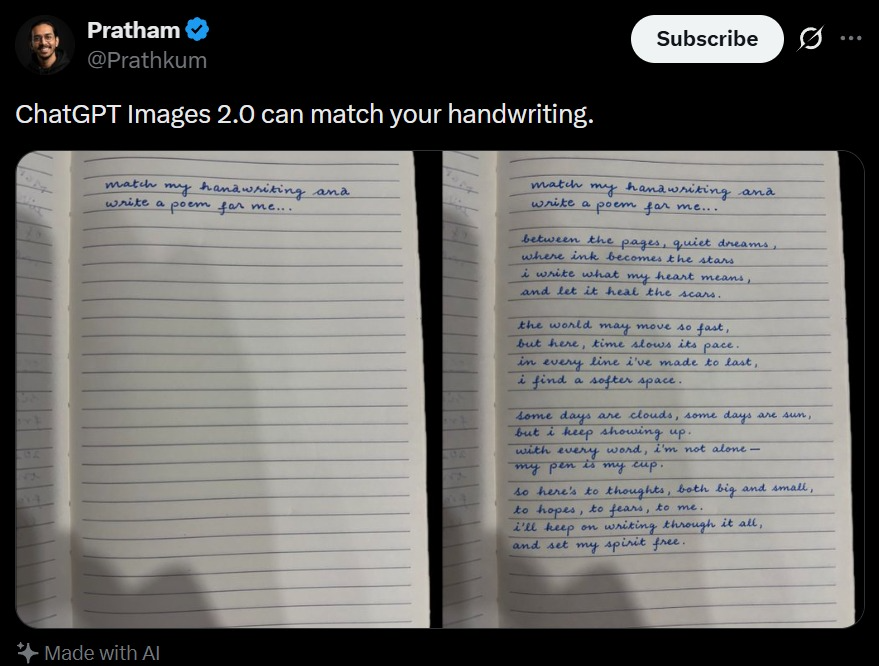
A realistic social media screenshot showing a handwriting-matching notebook comparison, useful for generating viral AI demo post mockups.
This ui mockup prompt is a strong starting point when you need a composed GPT Image 2 result with a clear subject, visual structure, and reusable style direction.
Aspect ratio
16:9 or 4:3
Quality pass
Standard first, then high detail
Workflow
Start text-to-image, then rerun with one focused edit at a time.
Full GPT Image 2 prompt
English prompt
A realistic dark-mode social media post screenshot styled like X/Twitter on a black interface. At the top left is a small blurred circular profile photo beside the display name {argument name="profile name" default="Pratham"} with a blue verification badge, and the handle {argument name="handle" default="@Prathkum"} underneath. At the top right is a rounded white Subscribe button plus two small interface icons. The tweet text in large white sans-serif type reads: {argument name="tweet text" default="AI assistant Images 2.0 can match your handwriting."} Below it is a side-by-side comparison image made of 2 notebook photos separated by a narrow black vertical gap. Both photos show an open lined notebook page shot from above under dim indoor lighting with soft shadows near the bottom edge. The left notebook page is mostly blank except for 2 handwritten lines in neat blue cursive at the top that say: {argument name="handwriting prompt text" default="match my hanawriting ana write a poem for me.."} Keep the misspellings and punctuation exactly as written. The right notebook page shows the same first 2 handwritten lines at the top, followed by a handwritten poem in matching blue cursive handwriting filling the page in 4 stanzas. The poem text reads exactly: {argument name="poem text" default="between the pages, quiet dreams, where ink becomes the stars, i write what my heart means, and let it heal the scars.

the world may move so fast, but here, time slows its pace. in every line i’ve made to last, i find a softer space.

some days are clouds, some days are sun, but i keep showing up. with every word, i’m not alone— my pen is my cup.

so here’s to thoughts, both big and small, to hopes, to fears, to me. i’ll keep on writing through it all, and set my spirit free."} The handwriting should look natural, slightly uneven, and convincingly human, with blue ballpoint pen texture. At the bottom left of the post, include a small sparkle icon and the words “Made with AI”. Preserve the look of a genuine mobile app screenshot with realistic spacing, rounded image corners, crisp UI typography, and subtle screen-capture softness.Related GPT Image 2 prompts
VR Headset Exploded View Poster
Generates a high-tech exploded view diagram of a VR headset with detailed component callouts and promotional text.
Illustrated City Food Map
Generates a hand-drawn, watercolor-style tourist map featuring numbered local food specialties, landmarks, and a legend.
E-commerce Live Stream UI Mockup
Generates a realistic social media live stream interface overlaying a portrait, featuring customizable chat messages, gift popups, and a product purchase card.
Knight-Mage Battles Stone Golem
A cinematic fantasy battle scene for generating epic game-style artwork of an armored heroine fighting a giant stone golem in a ruined cathedral.
Censored Elven Adventurers in Medieval Village
Generates a cinematic fantasy scene of two detailed elven adventurers walking through a medieval village with castle backdrop and obscured faces.
Faceless Cyberpunk Infiltrator
Generates a cinematic anime scene of an armed faceless woman infiltrating a high-security futuristic server room.